The Wildfly community has released Wildfly 9.0.0.Final. As mentioned in a previous post about Wildfly, this version brings several notable features. Two of them combine well: offline CLI and HTTP/2 support. In a datacenter context, the initial configuration should ideally happen without starting the full process or opening unnecessary ports. This post shows how to set up HTTP/2 using offline mode — useful for starting a JBoss instance with HTTP/2 already enabled.
How to set up HTTP/2 in Wildfly 9.0.0.Final using offline mode.
Download Wildfly
Available at this link.
Installation
tar -zxvf wildfly-9.0.0.Final.tar.gz
X509 Certificate
HTTP/2 does not strictly require encryption, but this example implements it for a complete secure setup.
Self-signed certificate creation:
keytool -genkey -alias server -keyalg RSA -keystore server.keystore -validity 365 -keysize 2048 -dname "CN=localhost, OU=IT, O=Gautric, L=Paris, ST=IDF, C=FR" -keypass password -storepass password
Export for the web browser:
keytool -export -alias server -keystore server.keystore -file server.crt -storepass password
keytool -import -v -trustcacerts -alias server -file server.crt -keystore server.truststore -keypass password -storepass password -noprompt
cp server.keystore $JBOSS_HOME/standalone/configuration/
cp server.truststore $JBOSS_HOME/standalone/configuration/
Secure configuration
Due to JDK 8 limitations, ALPN (Application-Layer Protocol Negotiation) is not supported natively. The library must be downloaded from the Eclipse Foundation. ALPN is mandatory for HTTP/2 over TLS.
export ALPN_VERSION=8.1.3.v20150130
curl http://central.maven.org/maven2/org/mortbay/jetty/alpn/alpn-boot/$ALPN_VERSION/alpn-boot-$ALPN_VERSION.jar > `pwd`/alpn-boot-$ALPN_VERSION.jar
export JAVA_OPTS="$JAVA_OPTS -Xbootclasspath/p:`pwd`/alpn-boot-$ALPN_VERSION.jar"
Configure HTTP/2 into Undertow
The key part: Wildfly is not running yet. The offline CLI commands configure the standalone instance directly. The embed-server command runs an internal Wildfly process and interacts with it.
$JBOSS_HOME/bin/jboss-cli.sh
You are disconnected at the moment. Type 'connect' to connect to the server or 'help' for the list of supported commands.
[disconnected /] embed-server
[standalone@embedded /] /core-service=management/security-realm=https:add()
[standalone@embedded /] /core-service=management/security-realm=https/authentication=truststore:add(keystore-path=server.truststore, keystore-password=password, keystore-relative-to=jboss.server.config.dir)
[standalone@embedded /] /core-service=management/security-realm=https/server-identity=ssl:add(keystore-path=server.keystore, keystore-password=password, keystore-relative-to=jboss.server.config.dir)
[standalone@embedded /] /subsystem=undertow/server=default-server/https-listener=https:add(socket-binding=https, security-realm=https, enable-http2=true)
[standalone@embedded /] reload --admin-only=false
[standalone@embedded /] exit
Undertow is the JBoss embedded HTTP server. The commands above create a security realm, configure the truststore and keystore for SSL, then add an HTTPS listener with enable-http2=true.
Expected output:
You are disconnected at the moment. Type 'connect' to connect to the server or 'help' for the list of supported commands.
[disconnected /] embed-server
[standalone@embedded /] /core-service=management/security-realm=https:add()
{"outcome" => "success"}
[standalone@embedded /] /core-service=management/security-realm=https/authentication=truststore:add(keystore-path=server.truststore, keystore-password=password, keystore-relative-to=jboss.server.config.dir)
{
    "outcome" => "success",
    "response-headers" => {
        "operation-requires-reload" => true,
        "process-state" => "reload-required"
    }
}
[standalone@embedded /] /core-service=management/security-realm=https/server-identity=ssl:add(keystore-path=server.keystore, keystore-password=password, keystore-relative-to=jboss.server.config.dir)
{
    "outcome" => "success",
    "response-headers" => {
        "operation-requires-reload" => true,
        "process-state" => "reload-required"
    }
}
[standalone@embedded /] /subsystem=undertow/server=default-server/https-listener=https:add(socket-binding=https, security-realm=https, enable-http2=true)
{
    "outcome" => "success",
    "response-headers" => {"process-state" => "reload-required"}
}
[standalone@embedded /] reload --admin-only=false
[standalone@embedded /]
Startup JBoss
$JBOSS_HOME/bin/standalone.sh
The server starts with HTTP/2 already enabled thanks to the offline configuration.
Verification
After startup (~3s), the welcome page can be checked with Firefox. The network panel shows the protocol version for each request.
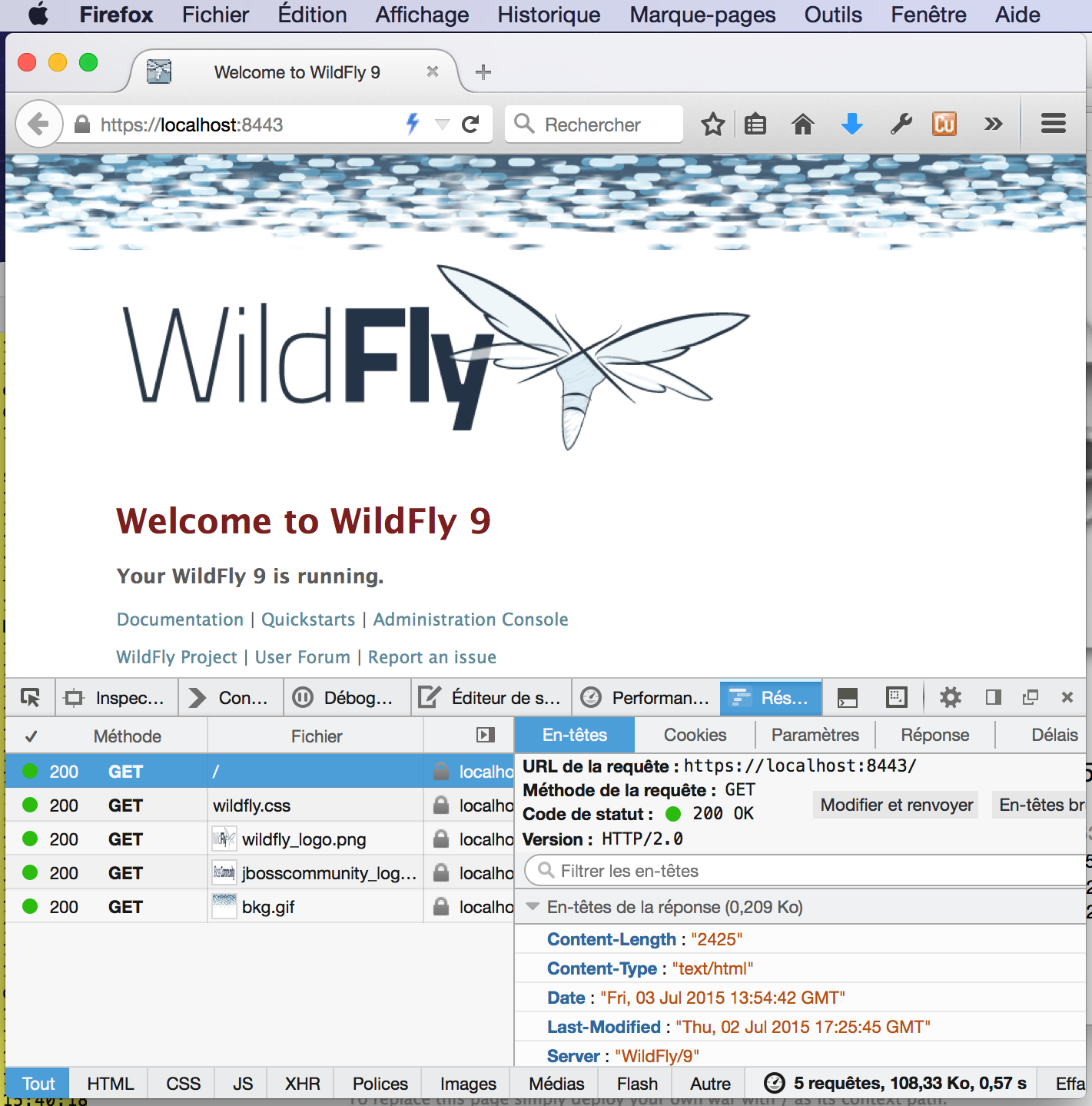
The protocol column shows “h2”, confirming HTTP/2 is active.