Following the release of Wildfly 9.0.0.Final and the previous post on enabling HTTP/2 via offline CLI, this article covers the same setup inside a Docker container. Docker simplifies middleware infrastructure deployment: open source, rich CLI tooling, automated build process, and straightforward runtime management.
How to set up HTTP/2 in Wildfly 9.0.0.Final with offline mode via Docker.
Prerequisites
Docker must be installed and running. See the official documentation for installation.
X509 Certificate
HTTP/2 does not strictly require encryption, but most browsers only implement it over TLS. Create certificates as described in the previous post.
Avertissement
Firefox does not accept self-signed certificates for HTTP/2. Chrome was used for testing instead. A full PKI generation script will follow.
Build the Wildfly Docker image
A directory must contain the following files:
-
keystore.jks and truststore.jks (SSL certificates)
-
offlinecli-http2.cli — commands to configure HTTP/2 in Wildfly
Download:
curl https://gist.githubusercontent.com/gautric/604e885885df0ed042f8/raw/f7d668edd82c35c23215a8a812074a4d47e1688b/offline-http2.cli -o offlinecli-http2.cli
- Dockerfile
Download:
curl https://gist.githubusercontent.com/gautric/c705e9e8572dd84b2bd9/raw/3ebfe805e767343f91104ef87ff3c0793f3efdd3/Dockerfile -o Dockerfile
Build the image:
docker build --rm=true --tag=wildfly-http2 .
Expected output:
[mbp:~/Source/local/wildfly-docker]$> docker --tlsverify=false  build --rm=true --tag=wildfly-http2   .
Sending build context to Docker daemon 74.75 kB
Sending build context to Docker daemon
Step 0 : FROM jboss/wildfly
 ---> e908c8c95a8b
Step 1 : ENV ALPN_VERSION 8.1.3.v20150130
 ---> Using cache
 ---> 87116bbedcb5
Step 2 : ENV ALPN_LIB_DIR /tmp/eclipse/lib
 ---> Using cache
 ---> b4672d6008ee
Step 3 : ENV HTTP2_ENABLE_CLI offlinecli-http2.cli
 ---> Using cache
 ---> 635ac811b927
Step 4 : ADD keystore.jks /opt/jboss/wildfly/standalone/configuration/keystore.jks
 ---> Using cache
 ---> d0e62373566c
Step 5 : ADD truststore.jks /opt/jboss/wildfly/standalone/configuration/truststore.jks
 ---> Using cache
 ---> f3e274485c1c
Step 6 : RUN mkdir -p $ALPN_LIB_DIR
 ---> Using cache
 ---> fd2da0f5ee22
Step 7 : RUN curl http://central.maven.org/maven2/org/mortbay/jetty/alpn/alpn-boot/$ALPN_VERSION/alpn-boot-$ALPN_VERSION.jar > $ALPN_LIB_DIR/alpn-boot-$ALPN_VERSION.jar
 ---> Using cache
 ---> f8032e23c9b5
Step 8 : ENV JAVA_OPTS "$JAVA_OPTS -Xbootclasspath/p:$ALPN_LIB_DIR/alpn-boot-$ALPN_VERSION.jar"
 ---> Using cache
 ---> 3e49cf6ca1c6
Step 9 : ADD $HTTP2_ENABLE_CLI /tmp/
 ---> Using cache
 ---> e309bce6ec5a
Step 10 : RUN /opt/jboss/wildfly/bin/jboss-cli.sh --file=/tmp/$HTTP2_ENABLE_CLI
 ---> Using cache
 ---> 85fb55ecc742
Step 11 : RUN rm -rf /opt/jboss/wildfly/standalone/configuration/standalone_xml_history
 ---> Using cache
 ---> 566da0a2cb80
Step 12 : CMD /opt/jboss/wildfly/bin/standalone.sh -b 0.0.0.0
 ---> Using cache
 ---> 3372a817bfc1
Successfully built 3372a817bfc1
The build process:
- Uses the official jboss/wildfly image as base
- Sets up the ALPN library for HTTP/2
- Adds the SSL certificates
- Runs the offline CLI script to configure HTTP/2
- Binds the server to all network interfaces (0.0.0.0)
Start the Wildfly Docker container
docker run -it -p 9990:9990 -p 8080:8080 -p 8443:8443 wildfly-http2
Port mapping:
- 8080: HTTP
- 8443: HTTPS (HTTP/2)
- 9990: Management interface
Verification
After startup (~3s), the welcome page is accessible at https://localhost:8443/ (Linux) or https://192.168.59.103:8443/ (macOS with Docker Machine). Chrome’s network panel confirms the protocol.
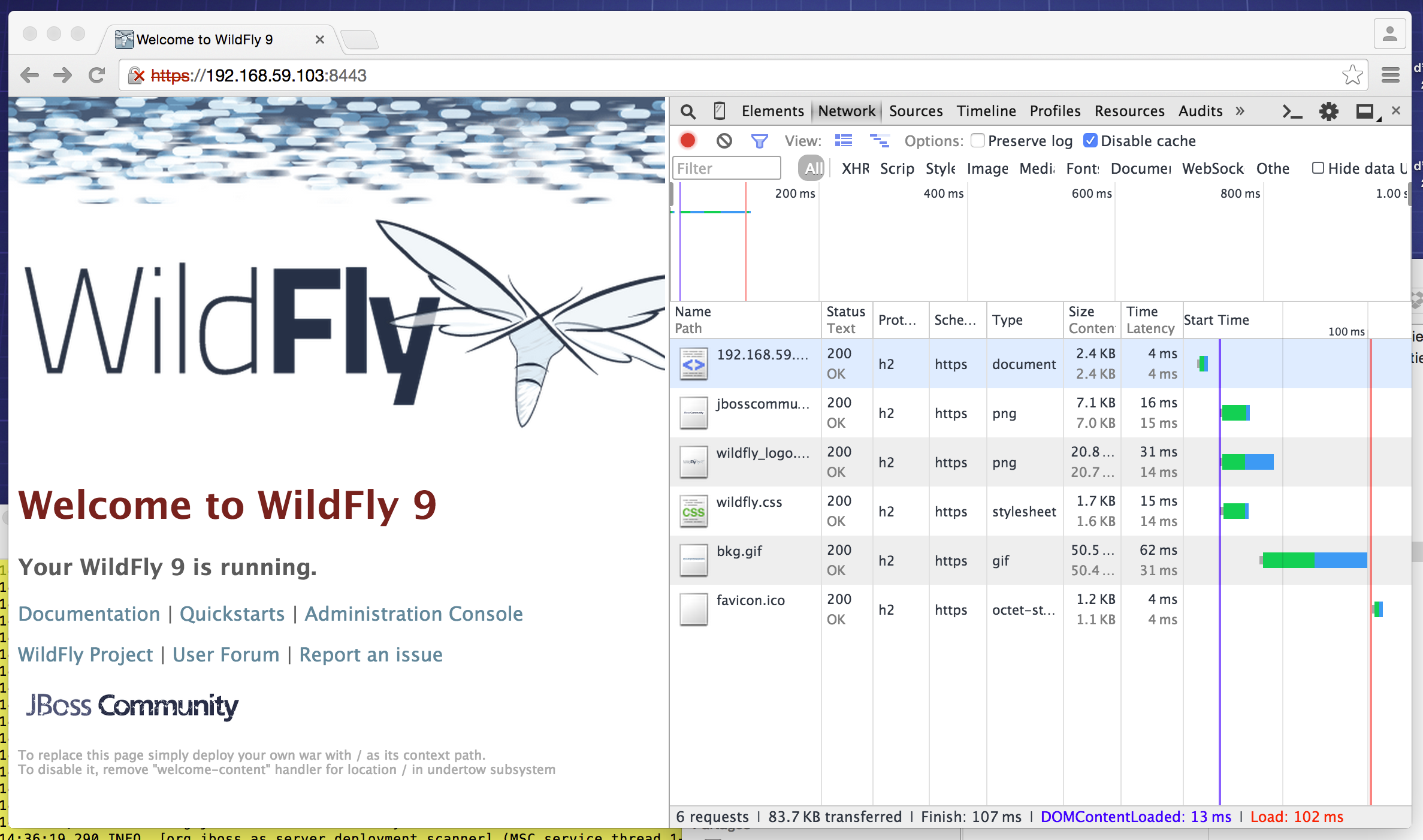
The “h2” protocol in the network panel confirms HTTP/2 is active.
Conclusion
Docker simplifies full stack deployment from OS to application, enabling consistent environments across development and production. HTTP/2 improves network performance (binary headers), latency (multiplexing) and security (TLS). Combining both technologies allows rapid deployment of modern, high-performance web applications.