One month ago, Henryk, Claus and the author started the Camel Labs project. This project provides new components for the IoT community based on Apache Camel. These components connect electronic devices (I2C, SPI, GPIO, Tinkerforge) and cloud services (PubNub, Cloudlet, MQTT) together. This lab demonstrates how to build an end-to-end IoT integration with I2C devices, an MQTT broker, and an I2C LCD display using just a few lines of code.
Lab Overview: I2C sensor + GPIO LED + MQTT broker + I2C LCD over Raspberry Pi
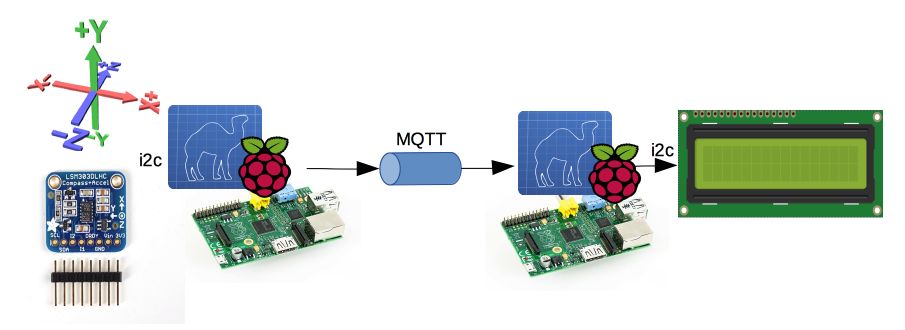
Two Camel routes are built in this lab:
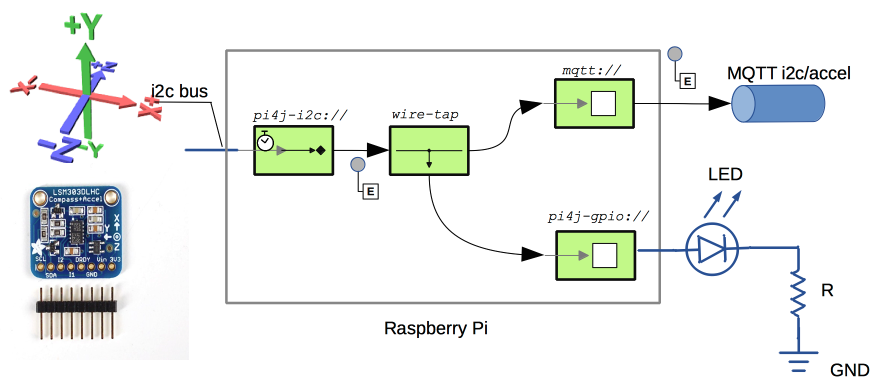
- A route to poll accelerometer data every 2 seconds, blink an LED on each message, and send the message to an MQTT topic
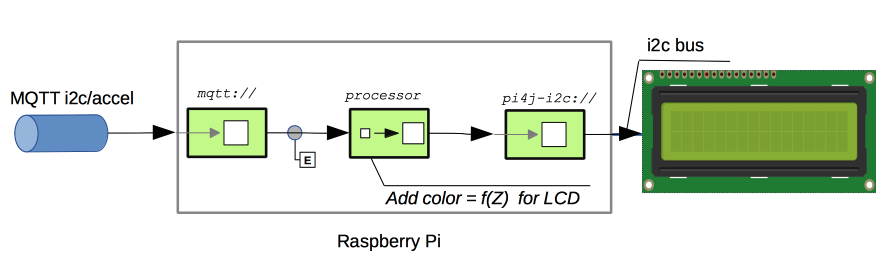
- A route to receive messages from the MQTT topic, check the Z value to set a header with a specific color, and display the message on an I2C LCD
Prerequisites
Required components:
- Two Raspberry Pi boards (buy one)
- Tested with: B model and B+
- Compatible with: A, A+, B+, 2B
- Both on the same VLAN
- Raspbian OS (download)
- 1 LED
- 1 220 Ω resistor
- Wires
- 1 breadboard
- 1 RGB LCD 16x2 available here
- 1 Accelerometer LSM303 available here
- 1 ActiveMQ default installation installation & configuration
Setting Up the Raspberry Pi
Always shut down power before wiring. Double-check all connections before powering on to avoid damaging the device.
The I2C module must be configured on the Raspberry Pi.
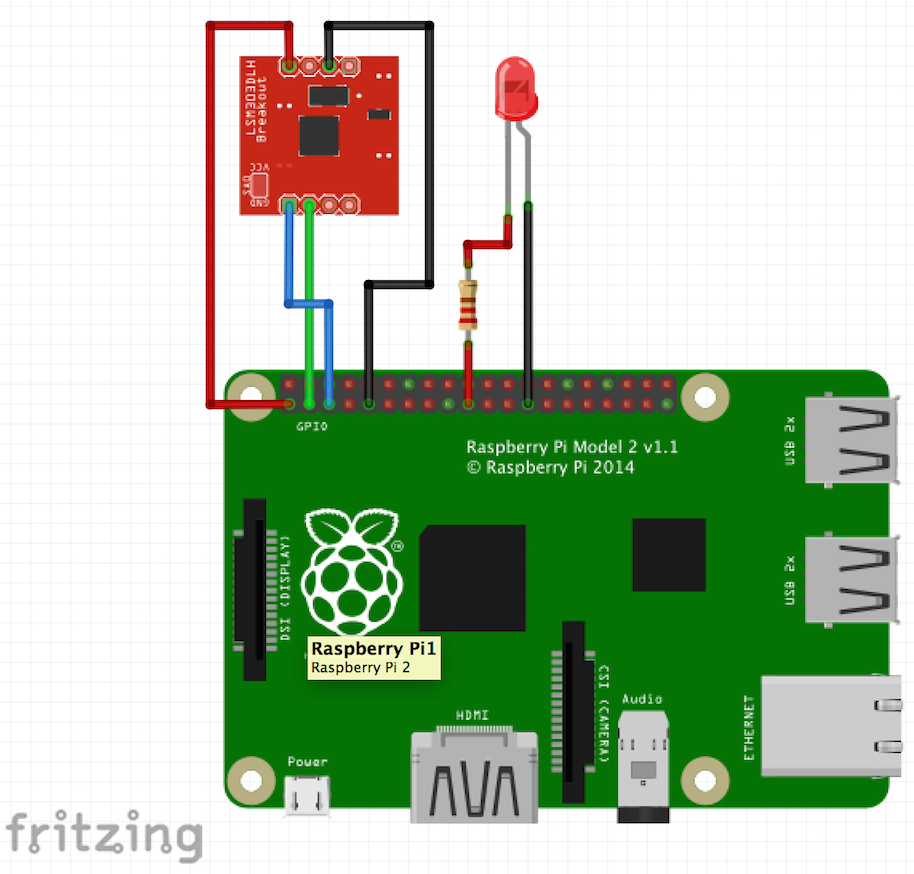
Wiring for Accelerometer and Raspberry Pi
Avertissement
The LSM303 from Adafruit is used here, but the wiring should be similar for other models.
Olivier LD’s wiring diagram can also serve as reference.

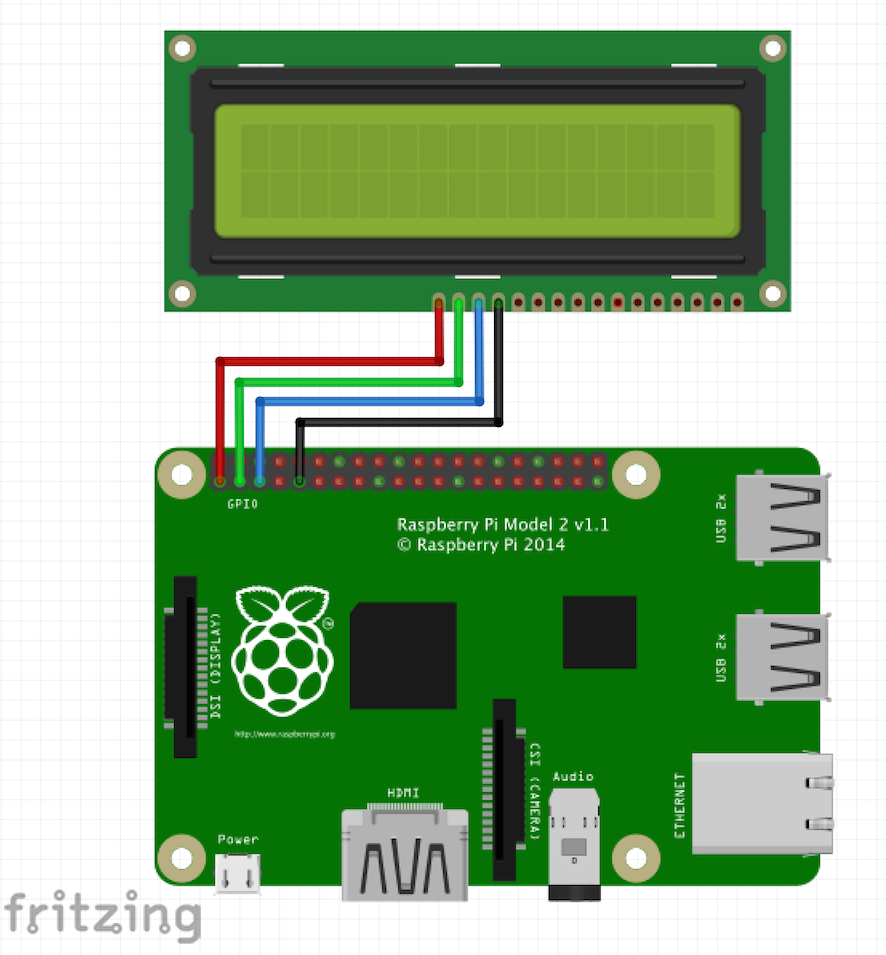
Wiring for LCD and Raspberry Pi
Avertissement
With the RGB LCD 16x2 from Adafruit, the LCD component plugs directly into the Raspberry Pi.
More information on LCD wiring
Wiring can be tested with the wiringpi library.
Installing the Pi4J Library
Currently, version 1.0 is available directly for Raspberry Pi:
$> ssh ${PI_USER}@${PI_HOST}
pi@rbpi> curl -s get.pi4j.com | sudo bash
Information
Public/Private key authentication is recommended for faster SSH connections.
For more details, visit the Pi4J installation guide.
Compiling the Raspberry Pi Component
This component is still under development. Some aspects may change at any time (URI format, etc.).
Building on a development machine is more efficient than on the Raspberry Pi:
$> git clone https://github.com/camel-labs/camel-labs.git
Creating the Accelerometer Program
The Accelerometer program Accel2MQTT is located in iot/components/camel-pi4j/src/main/java/com/github/camellabs/component/pi4j:
Creating the LCD Program
The LCD program MQTT2LCD is located in the same directory:
Compilation
$> mvn package -Dmaven.test.skip=true -P CopyDependencyforLab
Pushing Binaries to Raspberry Pi Devices
Copy JAR and dependency files to both Raspberry Pi devices:
$> ssh ${PI_USER}@${PI_HOST_ACCEL} 'mkdir -p /home/pi/camel'
$> scp iot/components/camel-pi4j/target/*.jar ${PI_USER}@${PI_HOST_ACCEL}:/home/pi/camel
$> ssh ${PI_USER}@${PI_HOST_LCD} 'mkdir -p /home/pi/camel'
$> scp iot/components/camel-pi4j/target/*.jar ${PI_USER}@${PI_HOST_LCD}:/home/pi/camel
Installing the Camel Program
Copy the log4j.properties file to ${PI_HOST}:/home/pi/camel:
#
# The logging properties used
#
log4j.rootLogger=INFO, out

# uncomment the following line to turn on Camel debugging
#log4j.logger.org.apache.camel=DEBUG
log4j.logger.org.pi4j=ALL
log4j.logger.com.github.camellabs.component.pi4j=ALL

# CONSOLE appender not used by default
log4j.appender.out=org.apache.log4j.ConsoleAppender
log4j.appender.out.layout=org.apache.log4j.PatternLayout
log4j.appender.out.layout.ConversionPattern=%d{ISO8601} [%30.30t] %-30.30c{1} %-5p %m%n
#log4j.appender.out.layout.ConversionPattern=%d [%-15.15t] %-5p %-30.30c{1} - %m%n
Starting the MQTT Broker via ActiveMQ
$mqtt.acme.com> cd $ACTIVEMQ_HOME/bin
$mqtt.acme.com> ./activemq start
INFO: Loading '/Users/XXXXXX/Application/activemq/apache-activemq-5.11.1/bin/env'
INFO: Using java '/usr/bin/java'
INFO: Starting - inspect logfiles specified in logging.properties and log4j.properties to get details
INFO: pidfile created : '/Users/XXXXXX/Application/activemq/apache-activemq-5.11.1/data/activemq.pid' (pid '4958')
Starting the Accelerometer and MQTT Sender Part
The first part collects X, Y, Z values from the accelerometer via I2C every 2 seconds, flashes an LED, and sends the vector to an MQTT topic.
Command Line
$> ssh ${PI_USER}@${PI_HOST_ACCEL}
pi@rbpi> cd camel
pi@rbpi> pi4j -r com.github.camellabs.component.pij4.Accel2MQTT
Console Output from ${PI_HOST_ACCEL}
pi@rbpi8 ~/camel $ pi4j -r com.github.camellabs.component.pi4j.Accel2MQTT
+ sudo java -classpath '.:classes:*:classes:/opt/pi4j/lib/*' com.github.camellabs.component.pi4j.Accel2MQTT
19:45:30,979 [                          main] Accel2MQTT                     INFO  main
19:45:33,185 [                          main] DefaultCamelContext            INFO  Apache Camel 2.15.2 (CamelContext: camel-1) is starting
19:45:33,200 [                          main] ManagedManagementStrategy      INFO  JMX is enabled
19:45:36,620 [                          main] DefaultTypeConverter           INFO  Loaded 188 type converters
19:45:38,347 [                          main] GPIOEndpoint                   DEBUG Endpoint[pi4j-gpio://12?action=BLINK&mode=DIGITAL_OUTPUT&state=LOW]
19:45:38,353 [                          main] GPIOEndpoint                   DEBUG  Pin Id > 12
19:45:38,360 [                          main] GPIOEndpoint                   TRACE  Field 12 not found in class class com.pi4j.io.gpio.RaspiPin
19:45:40,048 [                          main] DefaultCamelContext            INFO  AllowUseOriginalMessage is enabled. If access to the original message is not needed, then its recommended to turn this option off as it may improve performance.
19:45:40,050 [                          main] DefaultCamelContext            INFO  StreamCaching is not in use. If using streams then its recommended to enable stream caching. See more details at http://camel.apache.org/stream-caching.html
19:45:40,115 [                          main] GPIOProducer                   DEBUG Starting producer: Producer[pi4j-gpio://12?action=BLINK&mode=DIGITAL_OUTPUT&state=LOW]
19:45:40,499 [                          main] MQTTEndpoint                   INFO  Connecting to tcp://mac-mini.autric.net:1883 using 10 seconds timeout
19:45:40,895 [        hawtdispatch-DEFAULT-1] MQTTEndpoint                   WARN  No topic subscriptions were specified in configuration
19:45:40,909 [        hawtdispatch-DEFAULT-1] MQTTEndpoint                   INFO  MQTT Connection connected to tcp://mac-mini.autric.net:1883
19:45:41,495 [                          main] LSM303AccelerometerConsumer    DEBUG Starting consumer: Consumer[pi4j-i2c://1/0x19?delay=500&driver=lsm303-accel]
19:45:41,620 [                          main] DefaultCamelContext            INFO  Route: route1 started and consuming from: Endpoint[pi4j-i2c://1/0x19?delay=500&driver=lsm303-accel]
19:45:41,625 [                          main] DefaultCamelContext            INFO  Total 1 routes, of which 1 is started.
19:45:41,651 [                          main] DefaultCamelContext            INFO  Apache Camel 2.15.2 (CamelContext: camel-1) started in 8.478 seconds
19:45:42,624 [ thread #0 - pi4j-i2c://1/0x19] LSM303AccelerometerConsumer    DEBUG [16,120,1069]
19:45:42,850 [ (camel-1) thread #1 - WireTap] GPIOProducer                   TRACE Exchange[Message: [16,120,1069]]
19:45:42,859 [ (camel-1) thread #1 - WireTap] GPIOProducer                   TRACE action= BLINK
19:45:42,930 [ thread #0 - pi4j-i2c://1/0x19] pi4j                           INFO  Exchange[
, Id: ID-rbpi8-44586-1432064731732-0-2
, ExchangePattern: InOnly
, Properties: {CamelCreatedTimestamp=Tue May 19 19:45:42 UTC 2015, CamelMessageHistory=[DefaultMessageHistory[routeId=route1, node=wireTap1], DefaultMessageHistory[routeId=route1, node=to1]], CamelToEndpoint=log://com.github.camellabs.component.pi4j?multiline=true&showAll=true}
, Headers: {breadcrumbId=ID-rbpi8-44586-1432064731732-0-1}
, BodyType: com.github.camellabs.component.pi4j.i2c.driver.LSM303Value
, Body: [16,120,1069]
, Out: null:
]
19:45:43,630 [ thread #0 - pi4j-i2c://1/0x19] LSM303AccelerometerConsumer    DEBUG [14,120,1071]
19:45:43,641 [ (camel-1) thread #3 - WireTap] GPIOProducer                   TRACE Exchange[Message: [14,120,1071]]
19:45:43,643 [ (camel-1) thread #3 - WireTap] GPIOProducer                   TRACE action= BLINK
19:45:43,642 [ thread #0 - pi4j-i2c://1/0x19] pi4j                           INFO  Exchange[
, Id: ID-rbpi8-44586-1432064731732-0-6
, ExchangePattern: InOnly
, Properties: {CamelCreatedTimestamp=Tue May 19 19:45:43 UTC 2015, CamelMessageHistory=[DefaultMessageHistory[routeId=route1, node=wireTap1], DefaultMessageHistory[routeId=route1, node=to1]], CamelToEndpoint=log://com.github.camellabs.component.pi4j?multiline=true&showAll=true}
, Headers: {breadcrumbId=ID-rbpi8-44586-1432064731732-0-5}
, BodyType: com.github.camellabs.component.pi4j.i2c.driver.LSM303Value
, Body: [14,120,1071]
, Out: null:
]
19:45:44,220 [ thread #0 - pi4j-i2c://1/0x19] LSM303AccelerometerConsumer    DEBUG [38,140,1069]
19:45:44,231 [ (camel-1) thread #5 - WireTap] GPIOProducer                   TRACE Exchange[Message: [38,140,1069]]
19:45:44,233 [ (camel-1) thread #5 - WireTap] GPIOProducer                   TRACE action= BLINK
Starting the MQTT Reception and LCD Display Part
The second part receives X, Y, Z vectors from the MQTT topic, checks the Z value (STABLE or ERROR zone), changes the LCD color, and sends the message to the LCD.
Command Line
$> ssh ${PI_USER}@${PI_HOST_LCD}
pi@rbpi> cd camel
pi@rbpi> pi4j -r com.github.camellabs.component.pi4j.MQTT2LCD
Console Output from ${PI_HOST_LCD}
pi@rbpi2 ~/camel $ pi4j -r com.github.camellabs.component.pi4j.MQTT2LCD
+ sudo java -classpath '.:classes:*:classes:/opt/pi4j/lib/*' com.github.camellobs.component.pi4j.MQTT2LCD
19:45:33,277 [                          main] MQTT2LCD                       INFO  main
19:45:35,516 [                          main] DefaultCamelContext            INFO  Apache Camel 2.15.2 (CamelContext: camel-1) is starting
19:45:35,530 [                          main] ManagedManagementStrategy      INFO  JMX is enabled
19:45:38,969 [                          main] DefaultTypeConverter           INFO  Loaded 188 type converters
19:45:41,902 [                          main] DefaultCamelContext            INFO  AllowUseOriginalMessage is enabled. If access to the original message is not needed, then its recommended to turn this option off as it may improve performance.
19:45:41,903 [                          main] DefaultCamelContext            INFO  StreamCaching is not in use. If using streams then its recommended to enable stream caching. See more details at http://camel.apache.org/stream-caching.html
19:45:42,117 [                          main] MCP23017LCD                    DEBUG doStart
19:45:43,007 [                          main] MQTTEndpoint                   INFO  Connecting to tcp://mac-mini.autric.net:1883 using 10 seconds timeout
19:45:44,655 [        hawtdispatch-DEFAULT-1] MQTTEndpoint                   INFO  MQTT Connection connected to tcp://mac-mini.autric.net:1883
19:45:44,789 [                          main] DefaultCamelContext            INFO  Route: route1 started and consuming from: Endpoint[mqtt://pi4j?subscribeTopicName=i2c/accel&host=tcp://mac-mini.autric.net:1883]
19:45:44,792 [                          main] DefaultCamelContext            INFO  Total 1 routes, of which 1 is started.
19:45:44,843 [                          main] DefaultCamelContext            INFO  Apache Camel 2.15.2 (CamelContext: camel-1) started in 9.314 seconds
19:45:45,120 [        hawtdispatch-DEFAULT-1] pi4j                           INFO  Exchange[
, Id: ID-rbpi2-56870-1432064734049-0-2
, ExchangePattern: InOnly
, Properties: {CamelCreatedTimestamp=Tue May 19 19:45:44 UTC 2015, CamelMessageHistory=[DefaultMessageHistory[routeId=route1, node=process1], DefaultMessageHistory[routeId=route1, node=to1]], CamelToEndpoint=log://com.github.camellabs.component.pi4j?multiline=true&showAll=true}
, Headers: {breadcrumbId=ID-rbpi2-56870-1432064734049-0-1, CamelLCDBlinkCursor=false, CamelLCDColor=GREEN, CamelLCDCursor=false, CamelMQTTSubscribeTopic=i2c/accel}
, BodyType: String
, Body: [12,147,1064]
, Out: null:
]
19:45:45,128 [        hawtdispatch-DEFAULT-1] MCP23017LCD                    DEBUG >> Exchange[Message: [12,147,1064]]
19:45:45,403 [        hawtdispatch-DEFAULT-1] pi4j                           INFO  Exchange[
, Id: ID-rbpi2-56870-1432064734049-0-4
, ExchangePattern: InOnly
, Properties: {CamelCreatedTimestamp=Tue May 19 19:45:45 UTC 2015, CamelMessageHistory=[DefaultMessageHistory[routeId=route1, node=process1], DefaultMessageHistory[routeId=route1, node=to1]], CamelToEndpoint=log://com.github.camellabs.component.pi4j?multiline=true&showAll=true}
, Headers: {breadcrumbId=ID-rbpi2-56870-1432064734049-0-3, CamelLCDBlinkCursor=false, CamelLCDColor=GREEN, CamelLCDCursor=false, CamelMQTTSubscribeTopic=i2c/accel}
, BodyType: String
, Body: [3,136,1066]
, Out: null:
]
19:45:45,407 [        hawtdispatch-DEFAULT-1] MCP23017LCD                    DEBUG >> Exchange[Message: [3,136,1066]]
19:45:45,965 [        hawtdispatch-DEFAULT-1] pi4j                           INFO  Exchange[
, Id: ID-rbpi2-56870-1432064734049-0-6
, ExchangePattern: InOnly
, Properties: {CamelCreatedTimestamp=Tue May 19 19:45:45 UTC 2015, CamelMessageHistory=[DefaultMessageHistory[routeId=route1, node=process1], DefaultMessageHistory[routeId=route1, node=to1]], CamelToEndpoint=log://com.github.camellabs.component.pi4j?multiline=true&showAll=true}
, Headers: {breadcrumbId=ID-rbpi2-56870-1432064734049-0-5, CamelLCDBlinkCursor=false, CamelLCDColor=GREEN, CamelLCDCursor=false, CamelMQTTSubscribeTopic=i2c/accel}
, BodyType: String
, Body: [-3,133,1069]
, Out: null:
]
19:45:45,969 [        hawtdispatch-DEFAULT-1] MCP23017LCD                    DEBUG >> Exchange[Message: [-3,133,1069]]

..... OMIT ......

19:45:57,841 [        hawtdispatch-DEFAULT-1] pi4j                           INFO  Exchange[
, Id: ID-rbpi2-56870-1432064734049-0-44
, ExchangePattern: InOnly
, Properties: {CamelCreatedTimestamp=Tue May 19 19:45:57 UTC 2015, CamelMessageHistory=[DefaultMessageHistory[routeId=route1, node=process1], DefaultMessageHistory[routeId=route1, node=to1]], CamelToEndpoint=log://com.github.camellabs.component.pi4j?multiline=true&showAll=true}
, Headers: {breadcrumbId=ID-rbpi2-56870-1432064734049-0-43, CamelLCDBlinkCursor=false, CamelLCDColor=YELLOW, CamelLCDCursor=false, CamelMQTTSubscribeTopic=i2c/accel}
, BodyType: String
, Body: [-67,-411,993]
, Out: null:
]
19:45:57,844 [        hawtdispatch-DEFAULT-1] MCP23017LCD                    DEBUG >> Exchange[Message: [-67,-411,993]]
Final Result
Note: The LCD color scheme was adjusted for the low-cost camera:
- GREEN is now ON
- YELLOW is still YELLOW
- RED is now OFF
Conclusion
Integrating Camel Labs with Raspberry Pi is straightforward. The BMP180 driver is available for temperature and pressure sensing, and the TSL2561 driver for light sensing. The Java Camel DSL simplifies the assembly and integration of IoT devices. Switching from an MQTT broker to a SOAP web service requires minimal refactoring.
Raspberry Pi can integrate various electronic (I2C) devices and protocols (MQTT) with Camel IoT Labs components using just a few lines of code.
Links
- More information about me
- Colleague’s blog: Henryk Konsek (IoT, MQTT, etc.)
- Thanks to Olivier for LSM303 resources
- Thanks to Marcus Hirt for the Java LCD driver
- Camel Labs on GitHub
- Pi4J library
- Raspberry Pi
- Apache Camel